From Ambiguity to MVP: Designing a Student Portfolio for a Large Urban School District
A high-value district partner needed a student portfolio feature to support their learning initiative, but lacked clarity on their program requirements. Through structured discovery, collaborative workshops, and strategic simplification, we delivered an MVP that aligned with their goals while remaining flexible enough to evolve.
My Role: UX Designer
Collaborators: Client, Account Manager, Product Team (Product Designer, Product Director)
Skills: Object-Oriented UX, Information Architecture, User Research, Workshop Facilitation, Wireframing, Prototyping, Usability Testing, Documentation
Tools: Dovetail, Figjam, Google Forms, Figma, Maze, Confluence
Problem
Students needed a way to collect and reflect on learning artifacts as part of a district-wide initiative, but their current platform was outdated and overly complex.
The district hoped our platform could fill this gap. We were tasked with designing a new student portfolio feature, but the district's ongoing program redesign created uncertainty about how key elements (artifacts, reflections, and skills) should relate and function.
Challenge
How do you design an intuitive system when a client is still defining their own process?
Solution
I used structured discovery methods to surface critical questions early, then guided the district toward a simplified MVP through workshops and a testable prototype. The result was a clear simple foundation: students tag artifacts with skills and write a single reflection describing how those skills were demonstrated—eliminating the redundancy and complexity of the old system.
Impact
The feature was released for a small pilot in the Spring of 2025, and widely released at the start of the 25-26 school year.
Over 90,000 artifacts were uploaded to the portfolio by the end of September 2025.
“It's just been a game changer. That skills guide is like a teacher's dream…” - District Administrator
My Approach
Research & Discovery
I immersed myself in the district's context through their old initiative resources, videos of their previous platform, and a site visit where I observed student presentations and spoke with students, teachers, and district leaders. I took extensive notes, collected information in Dovetail, coded information, and examined patterns to create documents and artifacts for the team to understand the problem domain.
The initiative centered on helping students collect meaningful artifacts (projects, tests, photos, etc.) that demonstrate growth in five district-defined skills. Students later present these artifacts at milestone grade levels.
Through this research, I identified that students struggled to find their artifacts and choose the right skills; the reflection process also felt too repetitive and difficult because of the interface and the requirement of one reflection for each chosen skill.
Deliverables: Contextual Inquiry, Research Summaries
Mapping the System & Uncovering Questions
Though the initiative appeared simple on the surface, clearly defining the system elements would be crucial given the district was in the process of reshaping their program requirements.
Using Object-Oriented UX methods, I identified the system's key building blocks, and I mapped how they related to one another in FigJam, which quickly revealed some areas of ambiguity and complexity. For example, should reflections really be tied to skills, or artifacts? How should students engage with each?
Next, I outlined core attributes for each object and mapped expected user actions (CTAs) based on what students, teachers, and admins would need to do.
This early modeling helped uncover the right questions to ask before design.
Deliverables: System Models, Object Map, CTA Matrix, Question Bank
Workshop: Clarifying Relationships
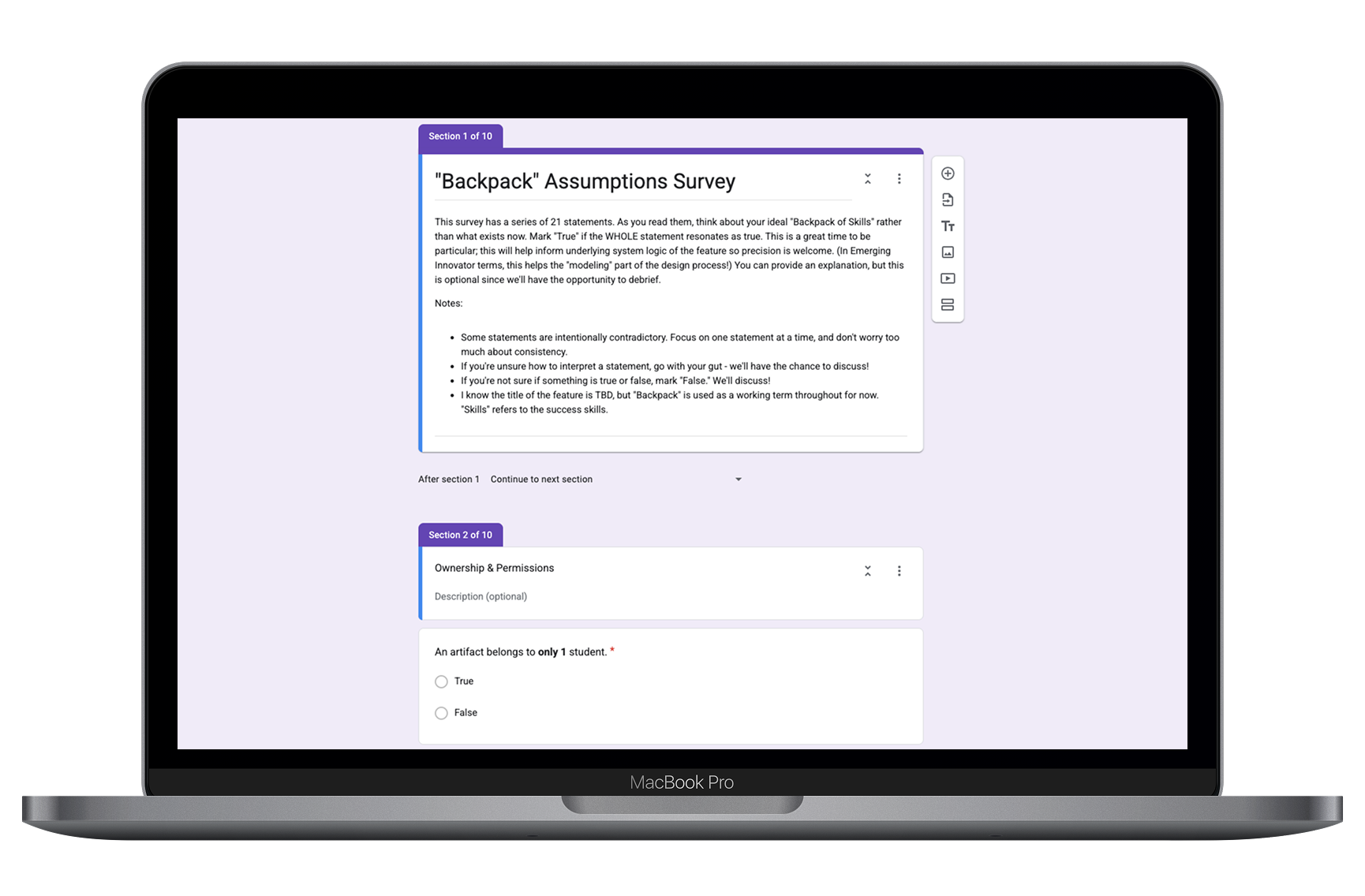
To address open questions, I created a series of true/false statements (some intentionally conflicting) to help the district think through key choices. Example: "An artifact has only one reflection" vs. "An artifact can have many reflections." We discussed their answers in a two-part workshop, diagramming different possibilities.
The workshop helped define much of the system and clarified relationships between core objects, but some decisions remained in flux as the district continued adjusting the program requirements or considered additional features that were attractive but expanded scope.
Deliverables: Survey, Workshop Agenda & Materials
Wireframing & Prototyping: Iterating Toward Simplicity
A key point of ongoing deliberation for the district was the requirement for reflections. Should students write more than one reflection on an artifact over time, like a journal, each about the skills demonstrated in that phase? Do they stick with the original requirement of one reflection per skill for an artifact? Or should students write one reflection about all the skills the artifact demonstrated?
This meant that the relationship of reflections to other objects was unclear, and there was a risk that a proposed approach to their requirements could maintain the complexity of the legacy platform.
I realized we needed to move to high fidelity quickly to show the impact of initiative requirements on the student experience.
I diagrammed the structure of different approaches the district was considering.
I translated these into quick user flows and rough wireframes to help visualize how each approach might work.
Then I worked with my colleague, a UI-focused Product Designer, to refine wireframes into higher-fidelity mockups that used our design system, which I used to build testable prototypes in Figma.
Due to IRB constraints, we couldn't test with students or teachers directly at that point, but I created a usability test using Maze to gather feedback from the district's broader team.
That feedback helped us advocate for a streamlined model: students tag artifacts with skills and write a single reflection describing how those skills were demonstrated, eliminating the need for multiple reflections or redundant skill tagging. One key improvement was making skill definitions more easily accessible in one place (a skill guide), helping students accurately tag artifacts and write reflections.
Deliverables: User Flows, Wireframes, High-Fidelity Mockups, Testable Prototype, Usability Test
Documentation: Defining the MVP and Setting Up for Delivery
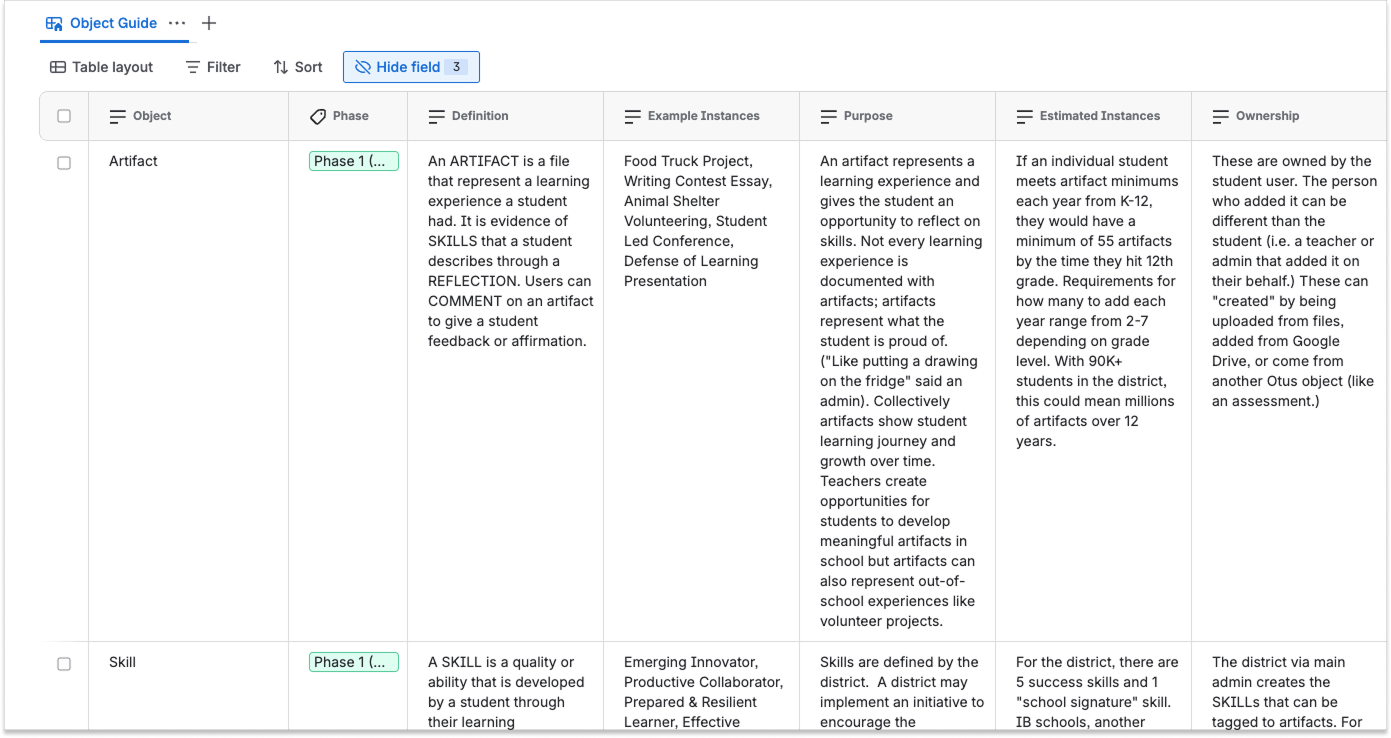
With the MVP defined, I created comprehensive documentation in Confluence outlining core objects, their relationships, system functionality, and key attributes while my teammate polished high fidelity mock-ups for the engineering team. The documentation captured months of discovery, design, and decision-making, providing the engineering team with a clear, structured reference to move forward.
Deliverables: Documentation
Reflection
So, how do you design a clear system when the client is still defining their own process? Here's what I learned:
Invest in structured discovery and system modeling, even if it seems simple on the surface. Using OOUX to model the system early surfaced critical questions the client hadn't considered. This also offers the client an opportunity to identify gaps in their own process before they become UX problems.
Don’t shy away from leading with stronger opinions. While collaboration is important, sometimes clients need a clear confident recommendation rather than multiple options, especially when decision-making stalls. Taking a stronger stance on simplifying their process felt uncomfortable, because it felt like advising them on their program design, but it ultimately would be in the interest of both the users and the district's goals. Simpler process = simpler UX.